Do IKEA Smart Devices Need the DIRIGERA Hub?
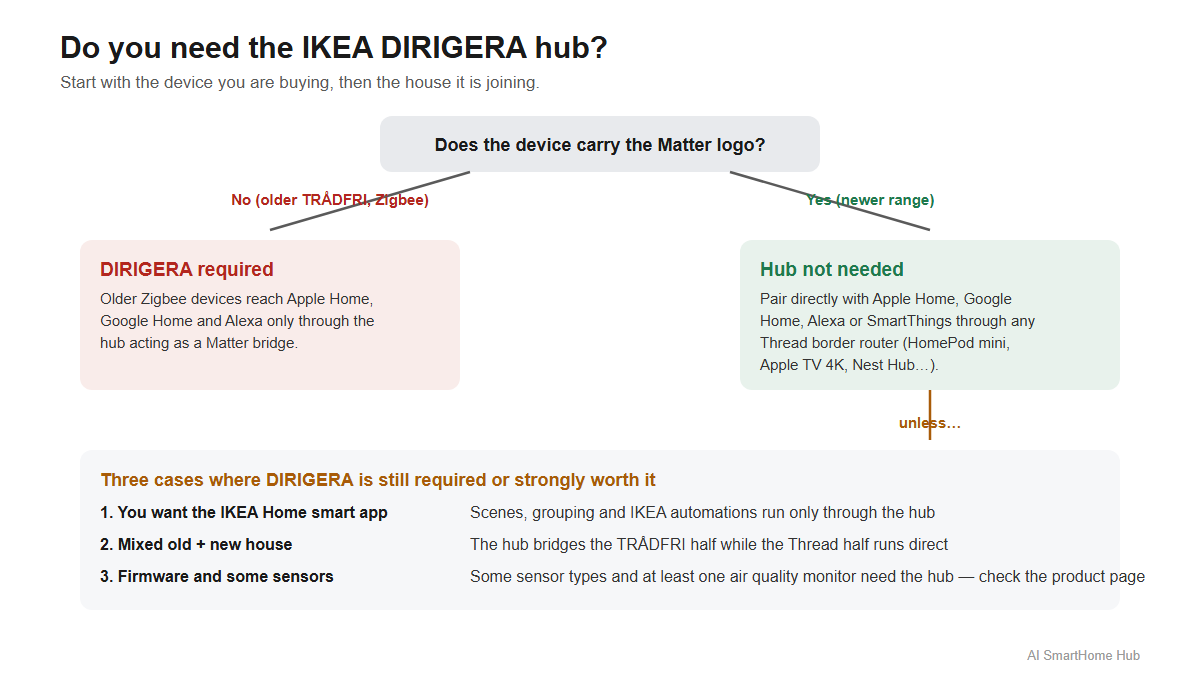
Short answer: not for the newer IKEA devices that carry the Matter logo — they pair directly with Apple Home, Google Home, Alexa or SmartThings through any Matter controller, with no DIRIGERA in the house. But DIRIGERA is still required in three specific situations, and skipping it blindly is how people end up with a sensor that pairs fine and then never updates.
The question keeps coming up because IKEA rebuilt its smart home range around Matter. IKEA's own Matter product guide now instructs buyers to power the device on, open "your preferred smart home app" — and IKEA lists that app as IKEA Home Smart, Apple Home, Google Home or Alexa — then scan the Matter QR code. No step in that sequence involves a hub.
 {width=1200 height=700}
What IKEA actually changed
The new range speaks Matter over Thread
IKEA's newer devices — the current bulbs, sensors and remotes — are Matter over Thread products. That means they do not join your phone or your router directly; they join a Thread network, and any Matter controller in the house can then see and control them. A HomePod mini, an Apple TV 4K, a Google Nest Hub, an Echo with a built-in Thread router, or a Samsung SmartThings Station all qualify.
The practical effect is that an IKEA bulb is no longer locked behind IKEA's own gateway. IKEA states on its Matter guide that its Matter-enabled products work with Apple Home using a HomePod or Apple TV as the controller, and equally with Google Nest, Amazon Echo and other Matter-supported systems. IKEA also lists multi-admin support, so the same bulb can live in two platforms at once.
DIRIGERA quietly became two things at once
The DIRIGERA hub itself was updated into a dual role, and understanding that split explains most of the confusion online. IKEA's support documentation lists both:
- As a Matter controller and Thread border router, DIRIGERA can host the new devices itself and give them the Thread network they need. IKEA's product documentation confirms the hub includes Thread border router functionality.
- As a Matter bridge, it takes IKEA's older Zigbee-based TRÅDFRI devices — the range that dominated the last decade — and publishes them into the Matter ecosystem so Apple Home, Google Home and Alexa can see them. IKEA's support pages describe the hub as Matter certified for exactly this bridging role.
So DIRIGERA is no longer a walled garden. It is a translator. The question "do I need it" is really two questions: does my device speak Matter by itself, and do I want what the translator adds.
When you genuinely do not need DIRIGERA
The device says Matter on the box, and you already have a controller
If the product is from the newer Matter range and your home already runs a Thread border router inside one of the big platforms, IKEA's own setup instructions treat the hub as unnecessary. IKEA's guide says the sequence is simply power on, open your preferred app, and scan the QR code — the bulb or sensor then joins your Thread network directly, appears in Apple Home or Google Home, and keeps working through whichever platform you paired it with.
For a buyer whose only goal is "IKEA prices, but inside Apple Home," this is the whole answer. The bulb costs roughly the same as a coffee, the border router is hardware you already own if you have a HomePod mini or an Apple TV 4K, and there is nothing else to buy.
You are a Home Assistant household
Home Assistant has no dedicated core integration for DIRIGERA as a controller; its documented path for these devices is the Matter integration or the HomeKit device integration. In practice that means a Home Assistant user can take the new IKEA devices straight onto their own Thread network and skip IKEA's hub entirely — one of the few brands' new ranges where that sentence is true.
What DIRIGERA still does that nothing else does
IKEA lists three things the hub adds, and each one is a reason real households keep it.
The IKEA Home smart app and everything inside it
Scenes, grouping, schedules and the IKEA-specific functions run through the IKEA Home smart app, and that app wants its hub. If you pair a bulb directly to Apple Home, you control it from Apple Home — the IKEA app's automations no longer apply to it. IKEA's own FAQ puts it plainly: the DIRIGERA hub is needed to use the IKEA Home smart app, and the hub is how the app guides you into Google Home, Alexa and Apple HomeKit.
Older TRÅDFRI gear
Every Zigbee-era TRÅDFRI bulb, plug and sensor that people bought over the past decade reaches Matter only through DIRIGERA acting as the bridge. A mixed house — new Thread bulbs upstairs, older TRÅDFRI spots in the kitchen — needs the hub for the old half, no matter how new the rest is.
Firmware and edge cases
This is the catch most roundups miss. At least one newer device, the Alpstuga air quality monitor, has been reported to require a DIRIGERA for its firmware updates. And some device types — motion sensors, door and window sensors, water leak detectors — have been documented as still wanting a hub in at least some markets and setups. IKEA's packaging does not always make this obvious at a glance, which is exactly why the "does it need a hub" question outlived the hub itself.
The honest summary: IKEA lists DIRIGERA as recommended rather than required for Matter devices, but recommended is doing real work in that sentence. The hub connects new and old IKEA devices together, acts as the Matter controller, and makes setup simpler — and for firmware on a handful of products, it is currently the only path.
The three cases where you cannot skip it
Pulling the above together, the situations where DIRIGERA stops being optional:
You own older TRÅDFRI (Zigbee) devices. They have no Matter radio and no Thread radio. The bridge is the only door into Apple Home or Google Home for them.
You want the IKEA app's scenes and automations. Pair a device directly to another platform and it leaves the IKEA app's world — IKEA's FAQ states that scenes, grouping and routines live in the IKEA Home smart app behind the hub. You cannot have both the direct Matter pairing and the IKEA-native automations on the same bulb.
A specific product's support requires it. The air quality monitor's firmware path and some sensor types are documented cases. Check the product's support page before buying if you planned to go hub-free, because the box will not tell you.
Check what your devices speak before you buy
The expensive mistake here runs in both directions: buying a hub for a house that did not need one, or buying hub-free and discovering a sensor cannot update. Both come from not knowing which radio each device uses.
AI SmartHome Hub's free planner builds a device list around your budget and ecosystem and flags what runs on Wi-Fi, Zigbee, Thread or something else, so the "does this need a hub" answer comes before the receipt rather than after it. The compatibility check answers the narrower question faster when you already have one specific device in mind. And for the protocol logic underneath it all, the guide on what a smart home hub actually does explains why a bridge, a border router and a controller are three different jobs that one box can hold at the same time.
When an IKEA device will not join
A device that scans fine and then never appears, or appears and drops, usually traces to the Thread side rather than the IKEA side: the border router is missing, overloaded, or fighting with a 2.4GHz Wi-Fi network on a crowded channel.
The Matter device not connecting guide steps through the usual causes in order, and the guide on Zigbee network interference covers the case where Thread and Zigbee networks share space with busy Wi-Fi — relevant in mixed-brand homes that still run a Hue Bridge or older TRÅDFRI gear. The Zigbee channel checker shows whether your Wi-Fi and your Zigbee channel are sitting on top of each other, which is the fastest single thing to rule out before factory resetting anything. If several devices dropped at once after a router change, the guide on smart devices dropping offline on mesh Wi-Fi explains why per-device resets tend to make that situation worse.
Frequently asked questions
Do I need the DIRIGERA hub for IKEA Matter devices?
No. IKEA's own guidance says the hub is not needed for Matter devices — you power the device on and scan its Matter QR code from Apple Home, Google Home, Alexa or the IKEA app. The hub is listed as recommended because it connects new and old IKEA devices, acts as a Matter controller, and simplifies setup.
Can I add IKEA lights to Apple Home without DIRIGERA?
Yes, for the newer Matter over Thread devices, provided you have a Thread border router such as a HomePod mini or an Apple TV 4K. Older TRÅDFRI devices need DIRIGERA as a Matter bridge.
What is DIRIGERA for, then?
IKEA lists three jobs: running the IKEA Home smart app with its scenes and automations, bridging older Zigbee TRÅDFRI devices into Matter, and acting as a Thread border router for the new range. It is a translator between IKEA's two generations and every other platform.
Do IKEA sensors need the hub?
Some do. Motion, door and window sensors and water leak detectors have been documented as requiring a hub in some setups, and at least one device — the Alpstuga air quality monitor — needs DIRIGERA for firmware updates. Check the specific product before assuming hub-free.
Will DIRIGERA work with Philips Hue or other brands?
As a Matter controller and border router, DIRIGERA can host other Matter devices in the IKEA app. It does not bridge third-party Zigbee devices such as Hue bulbs — those need their own bridge or a Matter-capable path of their own.
Is DIRIGERA obsolete now?
No. IKEA still sells it, positions it as the simplest setup path, and it remains the only route for older TRÅDFRI hardware and for the IKEA app's native automations. What changed is that it is a choice rather than a toll booth.
The short version
IKEA split its range in two. The Matter generation pairs directly with whatever platform you already run, and the hub is genuinely optional for those products. The Zigbee generation, the IKEA app's automations, and a short list of specific products still route through DIRIGERA. Decide which of the two generations you are actually buying — and check the product page for the word Matter before you assume the hub is dead.
Something not working?
The fix guide library covers specific problems step by step, or describe your issue and the troubleshooting assistant orders the steps by what usually works first.