What Is Apple HomeView? Apple's New Smart Home Hub Explained
Apple HomeView is Apple's first smart display: a 7-inch touchscreen fixed to a speaker base that doubles as an Apple Home hub. Apple introduced it on October 13, 2026 at its "Welcome Home" event, lists pricing from $299, and says the first units ship on November 13. If your home already runs on Apple Home or Matter accessories, HomeView is the most direct way to get a shared, voice-first control panel in a room people actually stand in. If your smart home is built on Alexa or Google Home, it is not the device for you.
What Apple HomeView actually is
HomeView is a small display and a speaker in one housing, and Apple sells it as a hub rather than as a tablet you carry around. Apple lists a 6.98-inch diagonal screen, which it rounds to 7 inches, with a 1088 × 1088 resolution and 220 pixels per inch. Apple says it supports True Tone and lists brightness from 0.3 nits for a bedroom at night up to 500 nits in daylight, so it stays legible on a kitchen counter and dim enough next to a bed.
The body is aluminum, and the screen sits on a stainless steel hinge above a domed speaker base, which lets you tilt it to whatever angle your counter or nightstand needs. Powering all of it is the same A18 chip family Apple uses in its phones, which matters for two reasons: on-device face recognition, and enough compute to run the new Siri.
Apple lists a 12-megapixel camera with an ƒ/2.4 aperture. It handles FaceTime calls with Center Stage framing, and it is also the sensor behind the face recognition that switches the interface between household members. Apple says the device supports up to 6 people, each with their own home screen, widgets and app layout. Shared content like family photo albums and the household music queue stays visible to everyone.
Audio is not an afterthought. Apple lists two full-range drivers in the display plus a down-firing woofer and two passive radiators in the base, with Spatial Audio and multiroom playback that ties into HomePod and AirPlay speakers. Handoff lets you start a song on your iPhone and move it to HomeView by bringing the phone close.
Two omissions are worth knowing before you order. There are no physical volume or power buttons, and there is no camera shutter or hardware microphone switch. Apple relies on software indicators and its own data pipeline instead, which is a design decision you either accept or you do not.
What it costs, and what the price does not include
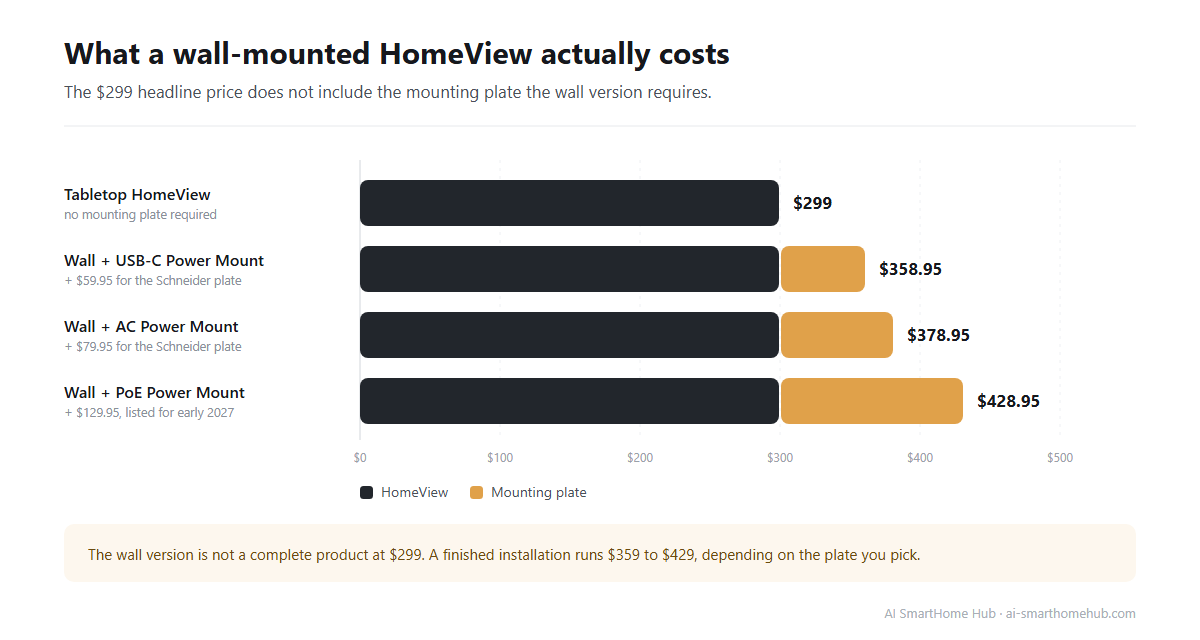
Apple lists both the tabletop model and the wall-mounted model at $299. The tabletop version comes in silver, starlight, rose pink and space gray, each with a color-matched cable. The wall version comes only in space gray and silver.
The wall version is not a complete product at that price. It needs one of the Schneider Home mounting plates sold separately, which Apple prices at $59.95 for the Power Mount USB-C Wall Connector and $79.95 for the Power Mount AC Wired. Apple lists the Power-over-Ethernet version at $129.95 for early 2027. If you go with the AC mount, a wall installation lands closer to $379, and the PoE route closer to $429 once it is available.
Apple lists Apple TV 4K at $299 with a redesigned remote that can play a sound when lost, and prices the HomePod mini at $149 in new colors, up from $129.
When and where you can actually buy one
Apple says pre-orders opened on October 13, with shipping from November 13. Apple lists the launch wave as the United States, Canada, the United Kingdom, Australia, New Zealand and India. Singapore opens pre-orders on October 15 and ships on the same November date, and South Africa gets the device through authorized resellers.
The European Union is not in the first wave. Apple has pointed to Siri AI availability as the reason, which means EU buyers should not plan around an imminent release.
HomeView is also not a standalone product in the way a speaker is. Apple lists a requirement of an iPhone running iOS 27.2 or later, or an iPad running iPadOS 27.2 or later, for setup and for the personalization features. On the network side it carries Wi-Fi 6E, Bluetooth 6.0 and Thread.
What HomeView can control
The hub side of HomeView is the reason most buyers will look at it. It controls Apple Home and Matter accessories by touch or by voice through Siri, and it can serve as a Thread border router for Thread devices on the same network.
In practice that covers the categories people fight with most: lights and switches, thermostats, door locks, and blinds and shades, all organized into rooms and categories on the home tab. Scenes and automations run from the screen or by voice, so a "Good Night" scene can lock the doors and drop the thermostat without anyone opening a phone.
Cameras get their own treatment. Apple lists support for up to 9 live camera feeds at once, which is more than most households will ever install, and it supports HomeKit Secure Video for recording and activity detection when paired with an iCloud+ plan. Apple also says the device works with the new Apple Home Collection, a line of cameras, thermostats, doorbells and a lock built with LG Electronics and Schneider Electric that arrives in December.
Alongside home control, HomeView is an entertainment and communication device. It runs Apple Music, Apple Podcasts, Apple TV and compatible third-party audio and video apps, handles FaceTime calls with people tracking, supports Messages replies by voice or on-screen keyboard, and includes an intercom for broadcasting to a single room or the whole house. In the kitchen it can run timers and walk through recipes step by step, which is the scenario Apple leaned on hardest in its announcement.
How HomeView compares with a HomePod, an Apple TV, or a rival smart display
Apple Home does not require HomeView. A HomePod, a HomePod mini or an Apple TV 4K can already act as the home hub for your accessories, and many Apple households run one of those today without a screen anywhere in the picture.
HomeView changes the interaction, not the platform. You get a panel that anyone in the house can walk up to and use, a display for camera feeds that does not require unlocking a phone, and a speaker good enough to be the room's main audio device. The feature that is hardest to replicate elsewhere is the multi-user layer: a device that recognizes who is standing in front of it and reshapes the screen accordingly.
Against Amazon Echo Show and Google Nest Hub, the difference is ecosystem, not hardware. HomeView is built for Apple Home and Matter. It does not natively manage Alexa or Google Home devices, so if your household is split across assistants, adding HomeView will not unify it.
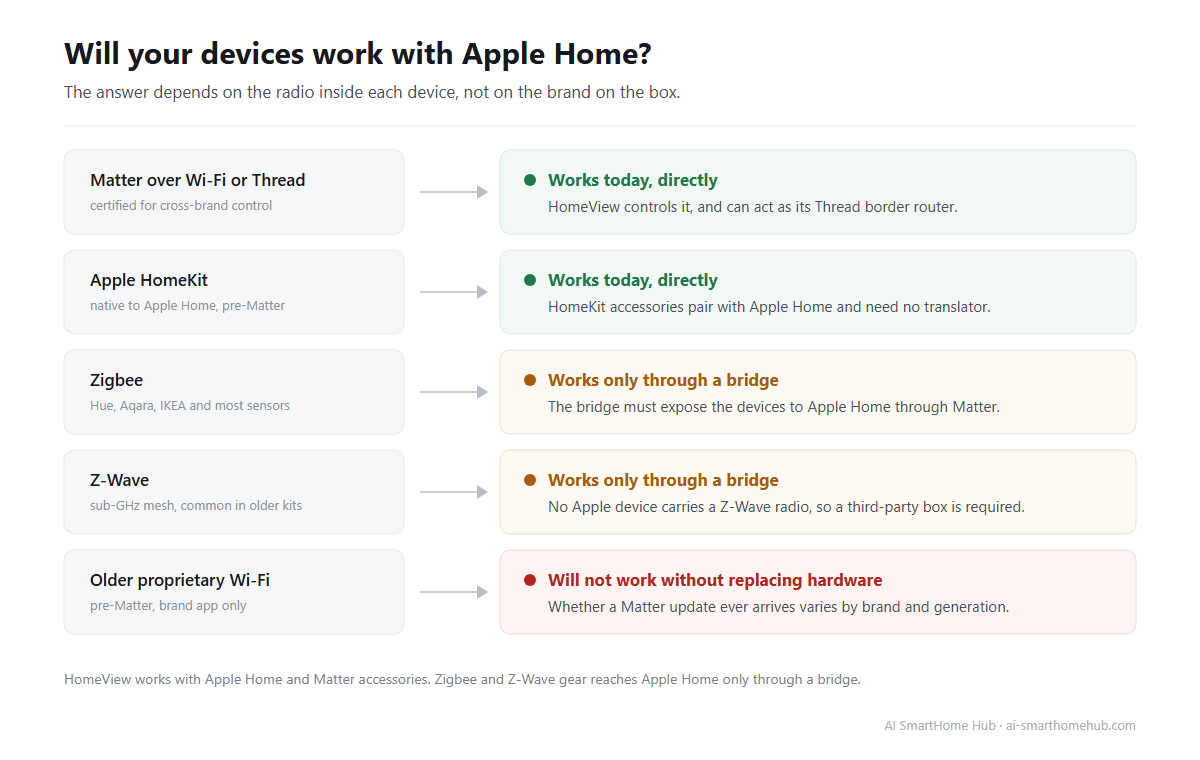
There is one more comparison worth making, and it is a limit rather than a feature. HomeView has no Zigbee or Z-Wave radio. Those protocols do not connect to Apple Home directly, so a home full of Zigbee sensors will still need a bridge or a third-party hub that exposes them through Matter.
The privacy design, and where it stops
Apple is treating privacy as the headline feature here, and the architecture backs it up. Apple says the A18 chip includes an isolated secure environment for camera and microphone data, keeping that processing away from the rest of the system. Face recognition for the six household profiles runs on the device rather than in the cloud.
Siri requests are handled either on-device or through Private Cloud Compute, Apple's approach to running larger models on server hardware without storing the request or making it readable to the company. For a device that sits in a bedroom and watches a room, that architecture is the answer to the obvious objection.
The honest counterpoint is that there is no physical shutter and no hardware mute. You are trusting software indicators, which is a normal tradeoff for this product category but worth stating plainly rather than glossing over.
Will HomeView work with the smart home you already have?
This is the question Apple's spec sheet does not answer for you, and it is the one that decides whether $299 is money well spent.
Matter is the compatibility layer that makes the answer "probably, if your gear is recent." Devices with Matter certification are designed to pair across ecosystems, and HomeView is built to be a controller and a Thread border router for them. Apple's own support documentation is explicit here: a home hub has to be set up before Matter accessories can be added to the Home app, and Thread-enabled Matter accessories need a Thread-enabled hub or a supported third-party border router. Devices that predate Matter are the risk. Zigbee and Z-Wave accessories do not talk to Apple Home on their own, and older Wi-Fi devices from smaller brands are inconsistent about whether they ever get a Matter update.
Two checks are worth doing before you order anything.
The first is an inventory: list every smart device you own and write down its protocol, not its brand. Wi-Fi, Matter, Thread, Zigbee and Z-Wave are what determine whether a new hub sees the device at all.
The second is a separation pass: sort that list into "works with Apple Home today," "works only through a bridge," and "will never work without replacing hardware." Most disappointment after a hub purchase comes from skipping this step rather than from the hub itself.
If you would rather not do that by hand, AI SmartHome Hub's free home planner runs Matter, Zigbee and Z-Wave compatibility checks against your budget and your chosen ecosystem, then returns a room-by-room plan you can shop from. It was built for the exact question of whether a set of devices will work together before you spend the money.
What to do when something stops responding
A hub changes how failures feel. While everything works, HomeView is invisible. When a link in the chain breaks, accessories across several rooms can show "No Response" at the same time, and it is easy to blame the wrong device.
The order that resolves most cases fastest is accessory first, then hub, then network. Restart or re-pair the single accessory before you touch the hub. If the problem is every device in one room, suspect the hub or its Thread border router role. If the problem is one protocol and not others, look at the network, especially if you run Zigbee devices alongside 2.4GHz Wi-Fi, where channel overlap is a common and underdiagnosed cause.
Two pages on this site already cover the Apple side of that chain: the guide on HomePod not responding and the Apple HomeKit no response fix. For everything else, AI SmartHome Hub's fix guide library covers Ring, Nest, Hue, Eufy, Sonos, Ecobee, Matter and more, and its AI troubleshooting assistant walks through steps ordered by what usually works first. If you also run Zigbee gear, the Zigbee channel checker will tell you whether your Wi-Fi and Zigbee channels are fighting.
Frequently asked questions
Is Apple HomeView just a HomePod with a screen?
Not exactly. A HomePod can already act as an Apple Home hub, so HomeView does not add hub capability that did not exist. What it adds is the screen, a shared multi-user interface with face recognition for up to six people, a camera for FaceTime, and a display for camera feeds and recipes. It is a different way to use the same platform.
Does Apple HomeView work with Alexa or Google Home devices?
Not natively. HomeView manages Apple Home and Matter accessories. If a device supports Matter, it can be controlled from HomeView regardless of which brand made it, but it will not manage an Alexa or Google Home ecosystem for you. Households split across assistants should expect two separate control surfaces.
Do I need an iPhone or iPad to use HomeView?
Yes. Apple lists an iPhone on iOS 27.2 or later, or an iPad on iPadOS 27.2 or later, for setup and for the personalization features that pull in Messages, Calendar and Reminders. There is no Android or web setup path.
Can HomeView replace my HomePod as the home hub?
It can serve as a hub, and it can also act as a Thread border router. If you already own a HomePod or Apple TV that is doing that job well, HomeView is an addition rather than a replacement, and you do not need to move the hub role for HomeView to work.
Does HomeView support Zigbee or Z-Wave?
No. HomeView works with Apple Home and Matter accessories and carries a Thread radio. Zigbee and Z-Wave devices need a bridge or a third-party hub that exposes them through Matter before Apple Home can see them.
Is Apple HomeView available in the EU?
Not at launch. The first wave covers the US, Canada, the UK, Australia, New Zealand, India, Singapore and South Africa. Apple has cited Siri AI availability as the reason the EU is excluded, and has not given a date for a European release.
The short version
A hub is the one piece of a smart home you should be able to forget about. Everything else you own is supposed to keep working when it does its job. Apple HomeView is worth $299 if you are already inside the Apple Home ecosystem and want a shared screen in the middle of the house. It is not worth $299 as a reason to move your whole home onto Apple, and no spec sheet can tell you which of those you are. Your device list can.
Something not working?
The fix guide library covers specific problems step by step, or describe your issue and the troubleshooting assistant orders the steps by what usually works first.