Does Philips Hue Still Need a Bridge?
Short answer: not for a small, single-room setup, and not for newer Hue lights if you already run a Thread border router. But if you want the full Hue experience — scenes that fade, lights that react to a film, sensors and switches, and control while you are away from home — you still need a Bridge, and there is one feature that silently disappears when you skip it.
The question keeps coming up because Philips Hue has quietly changed what its lights can do. At IFA 2026, Signify — the company behind Hue — introduced roughly two dozen new light fixtures, LED strips, and string lights, all built on a new Silicon Labs wireless chip. Signify's public launch materials stop short of listing the radios on each product, so the exact wireless capabilities come from reporting at the show rather than a printed specification. What the coverage reported is that these products speak Zigbee and Thread at the same time — as Signify's technical director for Hue described to press in Berlin — and that second radio is the whole story: it means a new Hue bulb no longer has to go through a Hue Bridge to reach Apple Home, Google Home, or anything that speaks Matter.
That sounds like the end of the Bridge. It is not. What actually happened is that Hue now offers three different connection paths, and each one gives you a different subset of what Hue can do. Most of the confusion online comes from treating those three paths as if they were interchangeable. They are not.
The three ways a Hue light can connect
Every current Hue light has more than one radio inside it. The question is only which one you end up using, and that decision is made for you by what else is in the house.
 {width=1200 height=720}
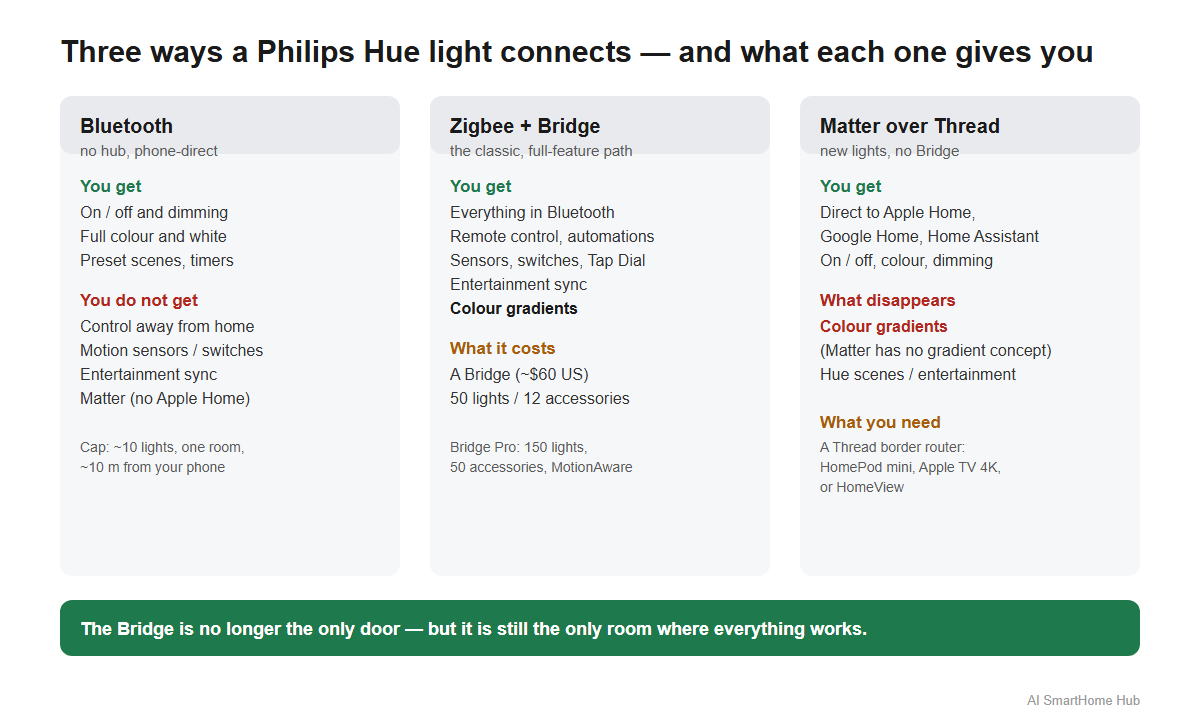
Bluetooth is the zero-hardware option. The Hue app pairs directly with a light and controls it without any hub. The ceiling is tight: up to ten lights, in one room, within roughly ten metres of your phone. You get on and off, dimming, the full colour and white range, preset scenes, and simple timers. What you do not get is the important part: no control away from home, no accessories such as motion sensors or dimmer switches, no entertainment sync, and no Matter. Philips lists Bluetooth on its accessories page as the entry-level path — Matter support sits with the Bridge and Bridge Pro — which is what rules Apple Home and SmartThings out of a Bluetooth-only setup.
Zigbee, through a Bridge, is the classic Hue setup. The Bridge connects to your router, runs its own Zigbee mesh, and stores your scenes, schedules, and automations so they keep working when your phone is off. This is the path that unlocks the full feature set — and it is still the one Philips itself describes as the most practical way to run Hue.
Matter over Thread is the new one. The new Hue lights can be added directly to Apple Home, Google Home, or Home Assistant through any Thread border router — a HomePod mini, an Apple TV 4K, or a HomeView — with no Hue Bridge in the house at all. This is the one path where the fine print matters most: Signify's launch materials do not spell out the radios on the box, so the Thread support is best understood as reported by the outlets that attended the launch rather than as a printed specification. If you are buying specifically for direct Matter pairing, check the product's own support page for confirmation before you rely on it.
What you actually lose when you skip the Bridge
The honest answer is not "nothing." The Bridge is what turns a collection of bulbs into a system, and three things in particular only work through it.
First, remote control and automations that survive your phone. Bluetooth lights answer to your phone directly; walk out of range or leave the house and they stop answering. The Bridge runs your schedules itself, so an automation fires whether or not your phone is nearby.
Second, accessories. Hue motion sensors, dimmer switches, smart buttons, and the Tap Dial all talk to the Bridge. Pair a switch to a Bluetooth-only light and there is nothing in the middle to hold the connection.
Third, and this is the one most articles miss, colour gradients. Matter has no concept of a colour gradient. The new Hue gradient strips only produce their signature fading effect through the Hue app and a Bridge. Pair one directly to Apple Home over Matter over Thread and it becomes an ordinary coloured strip — it will turn on, change colour, and dim, but it will not do the smooth multi-zone fade that makes a gradient strip a gradient strip. If the whole reason you bought that specific product is the gradient, you are buying a Bridge too, whether you planned to or not.
There is also entertainment sync — lights that follow a film or a game — which runs between the sync device and the Bridge, and which Home Assistant has no integration for at all. A bridgeless Bluetooth setup can pair a single light strip to a Screen Sync over Bluetooth, but that one strip is treated as a TV accessory, not a light the rest of your system can see.
When you genuinely do not need a Bridge
None of this means the Bridge is mandatory. There are two setups where skipping it is the right call, and they are increasingly common.
A small, single-room setup. If the entire ambition is a bedside lamp and a pair of downlights you dim from the couch, Bluetooth is enough. You are not missing much at that size, and the app handles the basics well.
An Apple Home or Google Home house that already has a Thread border router. If you already own a HomePod mini or an Apple TV 4K, the new Hue bulbs and the plain, non-gradient lights can be added to Apple Home directly over Matter — no Bridge, no extra hub. This is the genuinely new option, and it puts a new Hue bulb on the same footing as any other Matter over Thread bulb from another brand. The catch is the same one as above: skip the gradient strips on this path, because they need the Bridge to do the thing they exist to do.
A useful way to think about it: the Bridge stopped being the only door, but it is still the only room where everything works. Whether you need it comes down to one question — do you want Hue the system, or Hue the light bulbs?
Bridge or Bridge Pro?
If you do buy a Bridge, there is now a choice that did not exist before. The standard Bridge handles up to 50 lights and 12 accessories, which covers most homes comfortably. The newer Bridge Pro pushes that to 150 lights and 50 accessories, can connect over Wi-Fi as well as Ethernet, and adds a feature called MotionAware that lets your existing Hue lights act as motion sensors. Philips lists the difference plainly on the Bridge Pro product page: more capacity, 500 scenes, MotionAware, and a Zigbee Trust Center for connection security.
Prices vary by region and retailer, but Signify lists the standard Bridge around $60 in the United States, with the Bridge Pro priced higher. The point to remember is less the exact number than the logic: the standard Bridge is not obsolete, Philips still sells it and still ships firmware for it, and the Pro is a capacity upgrade for whole-house builds rather than a replacement you are being pushed toward.
Check your existing devices before you spend
The least costly mistake here is buying a Bridge for a setup that does not need one — or the reverse, buying a gradient strip assuming it will fade without a Bridge. Before you spend, work out which of the three paths each of your lights will actually use.
AI SmartHome Hub's free smart home planner walks through what you already own and shows whether it runs on Wi-Fi, Zigbee, or Thread, and what that means for the hubs you have. If you are trying to add a Hue bulb to Apple Home over Matter and it will not appear, the Matter device not connecting guide covers the usual reasons a Matter device stays invisible to your border router.
When a Hue bulb stops pairing
The other side of this question shows up as a problem rather than a decision: a Hue bulb that will not pair, or that pairs over Bluetooth but then vanishes from Apple Home. That is a different issue from the one above, and it usually traces to a radio or channel problem rather than a missing Bridge.
If a bulb will not pair to the Bridge at all, the Philips Hue bulbs not pairing guide steps through the usual causes in order. And because Hue's Zigbee mesh and your 2.4GHz Wi-Fi share the same crowded band, a channel overlap can make an entire room look broken — the Zigbee channel checker shows whether your Zigbee channel and your Wi-Fi channel are sitting on top of each other, which is the fastest single thing to rule out.
Frequently asked questions
Does Philips Hue work without a Bridge?
Yes, two ways. Over Bluetooth, the Hue app controls up to ten lights in one room with no hub, but without remote access, accessories, entertainment sync, or Matter. And newer Hue lights can join Apple Home or Google Home directly over Matter through a Thread border router, with no Bridge at all.
Can I add Hue lights to Apple Home without a Bridge?
Only the newer lights that support Thread, and only if you have a Thread border router such as a HomePod mini, Apple TV 4K, or HomeView. Older Hue lights speak Zigbee and Bluetooth only, so they reach Apple Home through a Bridge.
Does Matter over Thread work with Hue gradient strips?
It connects them, but it strips the feature they exist for. Matter has no concept of a colour gradient, so a gradient strip added directly over Matter will not produce its multi-zone fading effect. Gradient strips need the Hue app and a Bridge to fade.
Is the Hue Bridge obsolete now?
No. Philips still sells the standard Bridge, still ships firmware for it, and has not announced an end of support date. The Bridge Pro is a higher-capacity option, not a replacement.
How many lights can one Hue Bridge handle?
The standard Bridge supports up to 50 lights and 12 accessories. The Bridge Pro supports up to 150 lights and 50 accessories and adds MotionAware.
Do I need a Bridge for voice control?
Not necessarily. A compatible Amazon Echo or Google Nest speaker can turn Bluetooth Hue lights on and off, dim them, and change their colour with no Bridge in the house. If voice control is the only reason you were considering a Bridge, you may not need one.
The short version
The Bridge did not go away — it split into a choice. Bluetooth covers a single room with no hardware. Matter over Thread lets the newest Hue lights join Apple Home and Google Home directly, if you already own a Thread border router. And the Bridge remains the only path to the full Hue experience: remote control, accessories, entertainment sync, and the colour gradients that a growing number of Hue products are built around. Decide which of the three you are actually buying before you spend, and you will not end up paying for a Bridge you did not need, or a gradient strip that cannot fade.
Something not working?
The fix guide library covers specific problems step by step, or describe your issue and the troubleshooting assistant orders the steps by what usually works first.