Nest Aware Is Now Google Home Premium: What Changed, What You Kept, and What You Cannot Undo
Nest Aware no longer exists under that name. Google's home subscription is now called Google Home Premium, and the two plans you already knew were renamed rather than replaced: Nest Aware became Standard and Nest Aware Plus became Advanced. Nothing was taken out of your plan, and the pricing is unchanged. The part that catches people off guard sits somewhere else entirely, and it is worth reading before you accept any upgrade prompt: switching your home to the Gemini voice assistant is a one-way door.
What actually changed on October 1, 2025
The document that settles it
Google's support documentation is unambiguous. It states that as of October 1, 2025, Nest Aware (2nd gen) is called Google Home Premium, and it maps the old names onto the new ones directly: Standard replaces Nest Aware, and Advanced replaces Nest Aware Plus.
That mapping matters more than the name. Google describes the same subscription as a whole-home plan rather than a camera plan, which is why the rebrand was not simply cosmetic. The same monthly payment now reaches speakers and displays as well as cameras, because Gemini for Home runs on both.
Prices did not move
Google lists Standard at $10/month or $100/year and Advanced at $20/month or $200/year. Those are the same figures the two Nest Aware tiers carried, so the rename itself did not come with a price increase. If your bill went up recently, the change predates the rebrand rather than coming with it, and it is worth checking which plan you were moved onto.
What each plan includes now
Standard: the old Nest Aware, plus Gemini
Google lists 30 days of event-based video history, intelligent alerts covering familiar faces, garage door activity, packages, smoke and carbon monoxide alarms, sound detection for breaking glass, and whole-home activity history. On top of the security features, Google lists the Gemini for Home voice assistant and Help me create, which builds automations from a typed or spoken description rather than a setup wizard.
Advanced: the old Nest Aware Plus, plus AI on your video
Advanced keeps everything in Standard and adds 60 days of event-based history, up to 10 days of 24/7 history on cameras and wired doorbells, AI event descriptions, searchable video history through Ask Home, and a daily Home Brief summary that recaps what was recorded.
The two numbers to remember are 60 days and 10 days. Those are what separated Nest Aware Plus from Nest Aware, and they are still what separate Advanced from Standard. One structural detail carried over unchanged: both plans cover eligible devices in a single Google Home household, rather than charging per camera.
If you were on Nest Aware Plus, check the plan name
This is where confusion turns into a real problem. If you held Nest Aware Plus and you now find yourself described as a Standard subscriber, the 24/7 recording window and the longer history are the features you would notice missing first, because they are the two things Standard does not include. Google lists Advanced as the direct successor to Nest Aware Plus, so a plan sitting on Standard after a Plus subscription is worth a look at your subscription page before you assume the features were retired.
Two things to check before you pay for anything
The subscription is bundled into Google's AI plans
Google states that Google Home Premium is included at no extra cost for Google AI Pro and Ultra subscribers. AI Pro members receive the Standard plan and can move up to Advanced for another $10/month, while AI Ultra members receive Advanced automatically.
That creates a specific and avoidable waste. If you already pay for one of those AI plans and you then subscribe to Google Home Premium separately, you are buying the same entitlement twice from the same account. Check what your existing subscription already covers before adding anything.
Where you are allowed to subscribe depends on your phone
Google notes that Android users can subscribe through the Google Store or the Google Home app, while iOS users have to manage the subscription through the Google Store. If you are on an iPhone and there is no subscribe option where you expected it, that is the documented reason rather than a bug in the app.
Google also offers a 30-day trial of either plan with the purchase of a new Nest Cam, Nest Doorbell or Google Home Speaker, which is the cheapest way to test whether the camera features are worth keeping.
Why your subscription might still say Nest Aware
Google's support page says the rename does not apply to everyone. Subscriptions bought through a home security partner were left out of it and keep the Nest Aware name, and Google lists ADT, AT&T and Tata Sky among the partners whose accounts were not renamed.
So an account that still reads Nest Aware is following documented behaviour, not sitting on an update that failed. The practical difference is that those accounts are also outside the newer bundled features, which is the thing to check if you are comparing your plan against what a friend sees in the Google Home app.
The one change you cannot undo
What the switch applies to
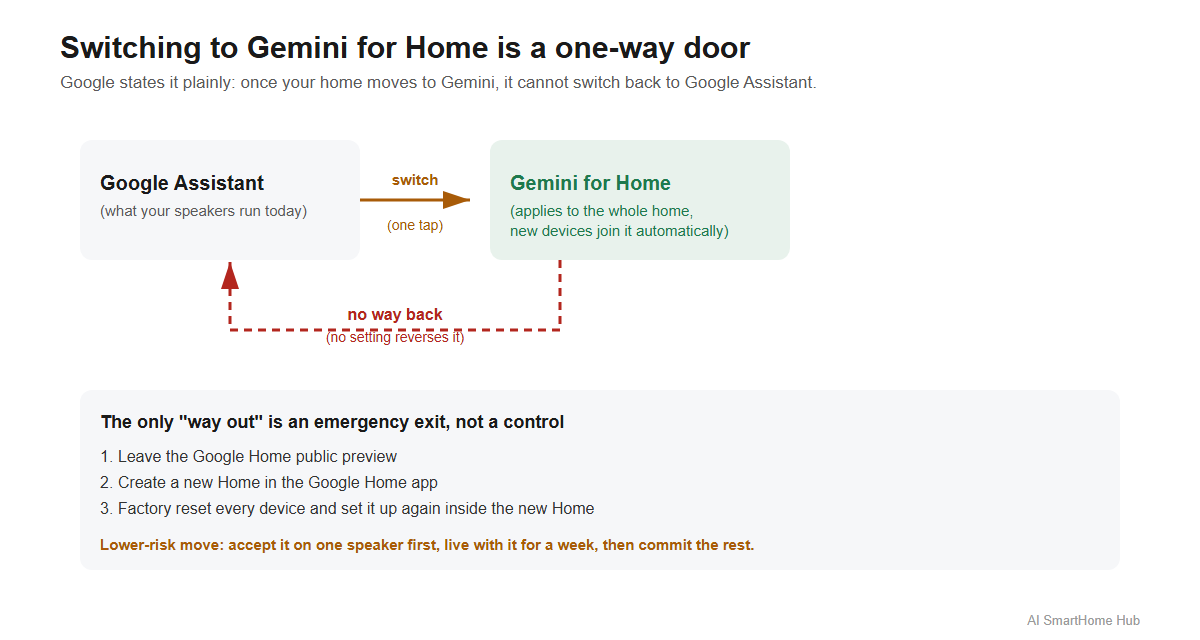
Gemini for Home replaces Google Assistant on Google speakers and displays, and Google's documentation states that once you switch your home to Gemini for Home, it cannot switch back to Google Assistant.
The scope is what makes this different from a normal app setting. Google says the change applies to everyone in your home once it is made, and that compatible devices added later will use Gemini instead of Google Assistant as well. Devices that are not compatible yet are described as switching automatically once they become compatible, so a single decision made today keeps applying as your setup grows.
 {width=1200 height=640}
Google lists the migration as early access on Google speakers and displays in the United States from October 28, 2025, in Canada from December 18, 2025 in English, and it has since expanded the early access list to 20 countries, including the United Kingdom, Germany, France, Italy, Spain, Japan, Australia and Mexico.
If you want out after switching
There is no setting that reverses it. What exists is a workaround documented by Android Authority: leave the Google Home public preview, create a new Home in the Google Home app, then factory reset every device and set it up again inside the new Home. It reportedly works only while Gemini remains optional on your hardware, and it costs you your entire setup.
Treat it as an emergency exit rather than a control. If you own more than one speaker, the lower-risk move is to accept the change on the device you would miss least and live with it for a week before committing the rest of the house.
Google has kept shipping Home updates since the migration began, so a first impression formed in the opening months is not necessarily what you would get today.
Which devices get the full version, and which do not
Google splits its own hardware list. The complete Gemini for Home voice assistant is listed for Google Nest Hub (2nd gen), Nest Audio, Nest Mini (2nd gen) and Nest Hub Max. Older speakers and displays support most Gemini for Home features but not Gemini Live, and Google names Nest Hub (1st gen), Google Home Max, Google Home Mini (1st gen), Google Home and Nest Wifi point in that group.
The firmware minimum people miss
Google lists minimum firmware for first-party devices: speakers need Cast firmware 3.76 or higher, and displays need Fuchsia firmware 28 or higher.
That requirement explains the most common version of the complaint, which is a speaker that never received the upgrade. If a device is on the compatible list and nothing has changed, the firmware is the first thing worth checking, and it usually resolves with an update and a restart rather than a replacement.
What is still free without a subscription
Google states that the basic features of the Gemini for Home voice assistant are available at no cost. That list includes smart home controls, media search and playback, alarms and timers, calendars, notes, lists and reminders, along with ordinary questions.
Google lists Gemini Live and the camera-history features as the parts that need a subscription. So the assistant itself did not move behind a paywall, and a speaker without any subscription still runs your lights and timers. The honest reading is that the parts relying on cloud AI and video storage are the parts that cost money, which makes the decision narrower than it first appears. If you do not review camera footage, most of what Google Home Premium offers is not something you would use.
Before you change your plan, check what your devices can do
The rename does not change what works in your home. Compatibility does, and it is the thing people discover after they have already paid.
AI SmartHome Hub's free planner builds a device list around your budget and ecosystem and flags what will and will not work together, covering Matter, Zigbee, Z-Wave, Thread and Wi-Fi rather than assuming one protocol. If you are weighing a new Nest Cam or Doorbell against hardware that records locally instead, the compatibility check answers that faster than comparing specification sheets. For the protocol question underneath it, the guide on Matter devices that will not connect explains why a device can be certified for Matter and still refuse to join your network.
When something stops responding after the switch
Two failures tend to arrive in the same week as a voice assistant migration: the speaker that never updated, and the camera that drops offline afterwards.
The fix guide library covers both, including Nest cameras going offline, a Google Home speaker that stopped responding, and how to reset a Google Home speaker properly rather than just unplugging it. The AI troubleshooting assistant walks through the same problems in the order that usually resolves them first, so it is the faster route when you are not sure which of the two you are looking at.
One pattern worth knowing before you start resetting anything: if several devices went offline at once rather than one, the cause is usually the network underneath them, which is covered in the guide on smart devices dropping offline on mesh Wi-Fi. Resetting each device individually in that situation tends to make the problem worse rather than better.
FAQ
Is Google Home Premium the same as Nest Aware?
For subscriptions bought directly from Google, yes. Google's documentation states that Nest Aware (2nd gen) was renamed Google Home Premium as of October 1, 2025, with Standard and Advanced replacing Nest Aware and Nest Aware Plus. The product carried over rather than being discontinued.
Did the price increase when it was renamed?
No. Google lists Standard at $10/month or $100/year and Advanced at $20/month or $200/year, the same tiers and pricing the plans carried before the rename. A recent increase on your bill came from an earlier change, not from the rebrand.
Can I go back to Google Assistant after switching?
Google's documentation says the switch cannot be reversed. Once your home moves to Gemini for Home, it cannot return to Google Assistant, and there is no setting that does it. The workaround that circulates involves rebuilding your entire Home setup from scratch.
Do I need a subscription to use Gemini on my speaker?
No. Google states the basic features are free, including smart home controls, media search and playback, alarms, timers, calendars, notes, lists and reminders. Gemini Live and video history search are the parts tied to a subscription.
Why does my account still say Nest Aware?
Because partner-billed subscriptions were left outside the rename. Google states that Nest Aware bought through a home security partner keeps the Nest Aware name, and it names ADT, AT&T and Tata Sky among those partners.
Why did my speaker never get the upgrade?
Check two things in order. First, whether your model is on Google's full-support list, since older devices get most features but not Gemini Live. Second, the firmware minimum, which Google lists as Cast 3.76 for speakers and Fuchsia 28 for displays.
Where this leaves you
Two questions decide this, and neither of them is answered by the price. The first is whether you actually use video history, because that is what the subscription is really selling and nothing else in the plan is hard to live without. The second is whether you are ready to make the voice assistant switch permanent, because that decision is the only part of this change that Google will not let you take back.
The order matters. Sort the second one first, on a single speaker, and you will know within a week whether the rest is worth paying for.
Something not working?
The fix guide library covers specific problems step by step, or describe your issue and the troubleshooting assistant orders the steps by what usually works first.