Is Apple HomeView Worth $299? HomeView vs HomePod mini 2 vs Apple TV 4K
Short answer: pay $299 for HomeView only if you want a screen that everyone in the house can walk up to and use. If you do not, Apple lists a HomePod mini 2 at $149 that does the same hub job for half the money, and an Apple TV 4K you were going to buy anyway does it for nothing extra. Apple did not announce a hub capability that HomePod and Apple TV did not already have. It added a screen, a camera and face recognition, which is either exactly what you wanted or entirely beside the point.
What an Apple Home hub actually does
Before comparing the three devices, it helps to separate what a hub does from what a speaker with a screen does.
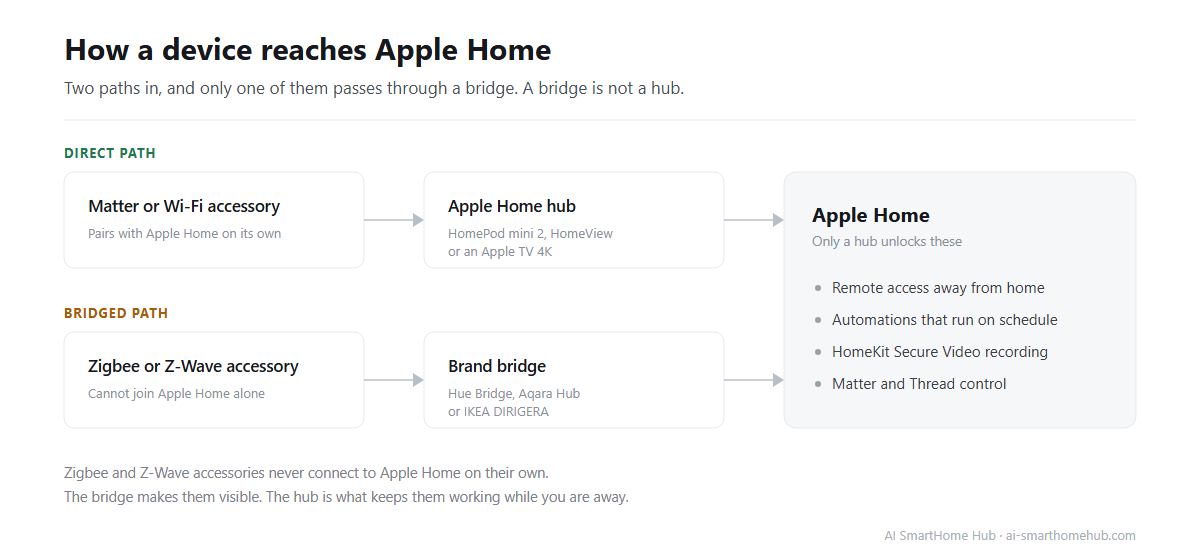
A hub is the always-on device that keeps Apple Home running when your phone is not at home. Without one, your accessories still work while you are standing on the same Wi-Fi network, and nothing works when you leave. With one, you get four things: remote access from outside the house, automations that run on a schedule without your phone present, HomeKit Secure Video processing for cameras, and the Matter and Thread controller role that newer accessories depend on. Apple's support documentation states the dependency plainly: a home hub has to be set up before Matter accessories can be added to the Home app, and Thread-enabled Matter accessories need a Thread-enabled hub or a supported third-party border router.
That list is identical across HomeView, HomePod and Apple TV. None of the three is better at being a hub than the others in any way Apple announced. The differences are all in what else the device is.
Two details that surprise people. First, an iPad can no longer serve as a hub, a feature Apple removed with iOS 16, so an old tablet in a drawer will not do the job, and Apple's hub instructions now name only HomePod, HomePod mini and Apple TV. Second, a brand bridge is not a hub. The Aqara, Philips Hue and IKEA boxes translate one brand's devices into Apple Home. They do not run your automations, and they do not give you remote access.
The one question that decides this for you
Are you buying a hub, or are you buying a screen?
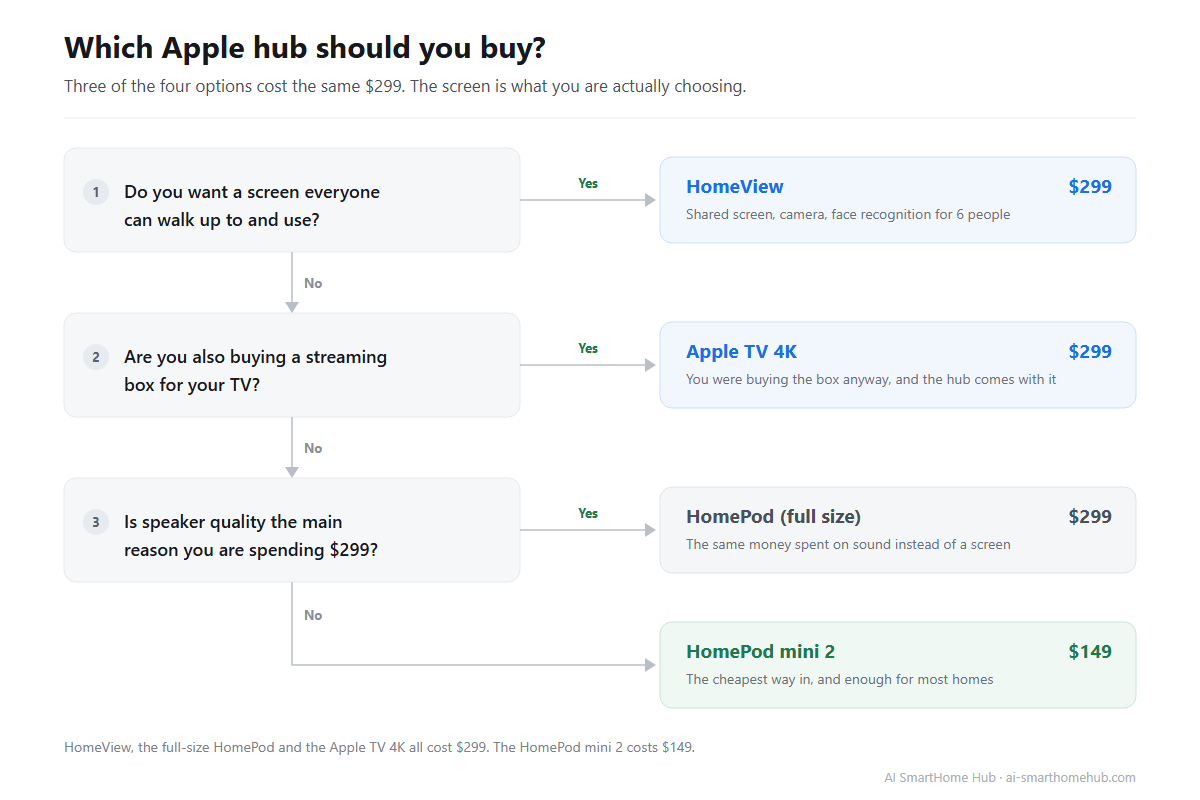
If the honest answer is "a hub," the decision is over: a HomePod mini 2 costs the least, ships the soonest, and does everything on the list above. If the honest answer is "a screen everyone can use," then HomeView is the only option Apple sells, and the $299 is not really being compared to anything.
The second question is whether you are also buying a streaming box. If you are, the Apple TV 4K is the option where the hub role costs you nothing extra, because you were going to pay for the television part regardless.
HomeView at $299: what you are actually paying for
HomeView is the only one of the three that is a display. Apple lists a 7-inch screen running from 0.3 nits at night to 500 nits in daylight, with an interface that changes with how far away you are standing, showing a simplified layout from across the room and full detail as you walk closer.
The feature nothing else in the lineup has is multi-user recognition. Apple says HomeView recognizes up to 6 people by face, and each person gets their own home screen, widgets and app layout. Personal content from Messages, Calendar, Reminders and Find My only appears when the right face is recognized and that person's iPhone is nearby and was recently unlocked. Shared photo albums and the household music queue stay visible to everyone.
Around that core, Apple lists a 12-megapixel camera for FaceTime with Center Stage framing, support for up to 9 live camera feeds at once, an intercom for broadcasting to a room or the whole house, hands-free kitchen timers and step-by-step recipes, and a set of customizable faces that include a Photos face with portrait depth effects and a Snoopy face that changes with weather and holidays. Apple says it also listens for smoke and carbon monoxide alarms.
Audio is more serious than the form factor suggests on the tabletop model: Apple lists two full-range drivers in the display, a down-firing woofer and two passive radiators in the base, with Spatial Audio, multiroom playback and Handoff from your iPhone. The wall-mounted version has no base, so it drops the woofer with it. Apple says camera and microphone data stays isolated inside the A18 chip's secure environment.
It earns the $299 if several people share the household, the device will live somewhere with foot traffic like a kitchen or hallway, you want camera feeds visible on a wall rather than behind Face ID, and you are comfortable that personal content needs a nearby unlocked iPhone. It is the wrong purchase if you live alone, if what you actually need is remote access and automations, or if music quality is the main reason you are spending the money.
HomePod mini 2 at $149: the default answer for most people
The second-generation HomePod mini is the least expensive way into an Apple Home hub, and it is the first of the three to arrive, shipping on October 30.
It runs the S10 chip with computational audio, and Apple says Sound Glow turns the top of the speaker into a light panel that pulses with the music using colors pulled from the current album art. Apple lists the same full hub job: remote access, automations, HomeKit Secure Video, Matter control and Thread border routing. It listens for smoke and carbon monoxide alarms the same way HomeView does, and it can now serve as the default speaker for a Mac.
One caveat matters if you are buying it for the assistant rather than the hub. Apple says HomePod mini 2 gets Siri AI through a future software update, so the conversational assistant is not there on day one. It also pairs with the Apple TV 4K for a four-speaker surround setup.
It is the right buy if you need a hub and nothing more, you want the smallest footprint, or you want one in several rooms. It is the wrong buy if you want a screen for the household, or you are equipping a main listening room where the full-size HomePod is the better tool.
The full-size HomePod at $299: the other way to spend $299
There is a quiet collision in this lineup that is easy to miss. Apple lists the full-size HomePod at the same $299 as HomeView, doing the same hub job, and it is a better speaker. It was not refreshed at this event.
If you are choosing between those two, the question is not which product is better. It is whether $299 should buy a screen or sound. A household that mostly listens to music should take the HomePod. A household that mostly wants to see the front door, the thermostat and everyone's calendar should take HomeView.
Apple TV 4K at $299: the option already in your cart
The fourth-generation Apple TV 4K is a streaming box that happens to be an excellent hub, and for a lot of people it is the correct answer for a boring reason: they were going to buy one anyway.
Apple lists an A19 chip, 128GB of storage, Wi-Fi 7, Bluetooth 6 and an Ethernet port, along with Thread and Matter support. Apple added three built-in far-field microphones so you can talk to Siri without picking anything up, and the new Siri Remote supports Precision Finding, which solves the specific problem of a remote lost inside a sofa.
The wrinkle is price. Apple prices it at $299, about $100 more than the model it replaces, and that older model is being discontinued. If the only reason you are considering it is the hub role, a HomePod mini 2 at $149 covers the same ground and leaves $150 on the table.
It makes sense if you want a streaming box, you prefer a wired Ethernet connection for stability, or you want the TV in your living room to be the device that runs your automations. It does not make sense if you want a hub and nothing else.
If you are not committed to Apple
Two alternatives deserve an honest mention. Amazon's Echo Show and Google's Nest Hub both put a screen and a voice assistant on a counter, both typically cost less than HomeView, and neither asks you to own an iPhone.
The tradeoff is the ecosystem rather than the hardware. HomeView manages Apple Home and Matter accessories. It does not manage Alexa or Google Home devices for you, and it will not unify a household that is already split across assistants. If most of your devices already live in one of those ecosystems, buying a screen from that ecosystem is the coherent move, and adding an Apple hub will not change what your existing gear can do.
How many hubs should you own
One is enough for most homes. A single HomePod mini 2 or Apple TV 4K unlocks remote access, automations, HomeKit Secure Video, Matter and Thread on its own.
A second hub is about resilience rather than features. If one goes offline, Apple Home fails over to the other automatically, and the Home app now lets you turn off automatic selection and designate which device acts as the primary hub, which is useful if you want an Ethernet-connected Apple TV handling automations while a HomePod stays on standby. Beyond two, you are extending Thread coverage across floors or outbuildings rather than adding anything new.
You do not need one hub per room, and you should not buy a hub to solve a device compatibility problem. Those are different issues.
Check what your devices need before you spend
This is where most disappointing purchases start. Buying an Apple hub does not make an incompatible device compatible.
Matter is the layer that makes cross-brand control possible, and all three devices here support it; Apple describes it on the Home app page as the cross-platform industry standard. Zigbee and Z-Wave accessories do not connect to Apple Home on their own, no matter which hub you install; they need a bridge or a third-party hub that exposes them through Matter first. Older Wi-Fi devices from smaller brands are the other common trap, because whether they ever receive a Matter update varies by manufacturer and by generation.
Before you pick a hub, list every smart device you own with its protocol rather than its brand, and sort the list into "works with Apple Home directly," "works through a bridge," and "needs replacing."
If that sounds tedious, AI SmartHome Hub's free home planner runs Matter, Zigbee and Z-Wave compatibility checks against your budget and ecosystem and returns a room-by-room plan, which answers the pre-purchase question in one pass. If you have already hit a wall and a device refuses to join, the guide on Matter devices not connecting walks through the usual causes.
If a hub misbehaves after you install it
A hub failure is confusing because it rarely looks like one. A single broken accessory is an accessory problem. When several accessories in different rooms go unresponsive at the same moment, or automations stop firing while manual control still works, the hub is the more likely culprit, and the fastest check is to power-cycle the hub and confirm it shows as connected in the Home app.
If the pattern points at one protocol rather than one room, the problem is usually the network underneath, especially in homes running Zigbee alongside 2.4GHz Wi-Fi, where the two share the same crowded band and a single overlapping channel can make a whole room look broken. AI SmartHome Hub's Zigbee channel checker shows whether your Zigbee channel and your 2.4GHz Wi-Fi channel are sitting on top of each other.
The fix guide library covers HomePod, HomeKit, Matter and the accessory brands that most often fail to pair, and the AI troubleshooting assistant orders its steps by what resolves the problem most often first.
Frequently asked questions
Does HomeView replace my HomePod?
No, and it does not need to. Both can act as a home hub, and Apple Home handles multiple hubs without conflict. If your HomePod already covers the hub role well, HomeView is an addition rather than a swap.
Do I need a hub if all my devices are Wi-Fi?
Not strictly. You can control Wi-Fi accessories from the Home app while you are on the same network. Apple says you need a hub the moment you want remote access, scheduled automations, HomeKit Secure Video or Thread support.
Can I use an old iPad as an Apple Home hub?
No. Apple removed iPad hub support with iOS 16. HomePod, HomePod mini and Apple TV are the current options.
Can I run two hubs at the same time?
Yes, and it is a reasonable idea. Apple Home fails over automatically if one goes offline, and you can now choose which device acts as the primary hub. Two is generally the useful maximum; more than that is about extending Thread range.
Does HomeView work without an iPhone?
Not for the parts that make it interesting. Apple lists a requirement of an iPhone on iOS 27.2 or later, or an iPad on iPadOS 27.2 or later, for setup and for the personalization features, and personal content only appears when the recognized person's unlocked iPhone is nearby.
Is the $299 Apple TV 4K worth it if I only want a hub?
Only if you want the streaming box too. As a pure hub purchase it is the most expensive way to get the same four capabilities a $149 HomePod mini 2 provides.
The short version
Apple built three hubs at three price points and gave the hub function to all of them. What separates HomeView is not that it controls more of your home, it is that it puts the controls where other people can reach them. Spend $299 on it if a shared screen is the thing you have been missing. Spend $149 on a HomePod mini 2 if you have not, and put the difference toward the devices that actually need to be replaced.
Something not working?
The fix guide library covers specific problems step by step, or describe your issue and the troubleshooting assistant orders the steps by what usually works first.